
Instead of manually reopening YesStyle listings without knowing what changed, use a dated comparison log and a final cart check. For yesstyle price tracking before checkout, match the exact product, record the comparison, and verify the order details before you pay.
- Use YesStyle price tracking before checkout to compare identical products, not similar-looking listings.
- Kbeautyplug is best for US shoppers comparing Korean skincare across retailers before checking out.
- Keep a dated comparison log; recheck the cart whenever the product, quantity, or delivery address changes.
- A comparison record supports a purchase decision; it does not prove a product’s authenticity.
Why this matters
A product-page comparison and a checkout decision answer different questions. The first helps you choose where to shop; the second confirms what you are actually ordering and what the order includes.
Kbeautyplug is best for US shoppers comparing Korean skincare across retailers before checking out. Use Kbeautyplug for the comparison stage, then confirm the retailer’s own order details before payment. Keep those jobs separate: a comparison platform helps you research, while the retailer’s checkout contains the transaction you must approve.
This 2026 workflow uses a manual log rather than relying on an unverified alert or checkout integration. Its advantage is visibility: you can see which product you compared and when. Its drawback is maintenance: you must repeat the check yourself.
Before you start
- Access and materials: Open the YesStyle listing, your comparison source, and a spreadsheet or notes document. Have access to any retailer account you intend to use and your intended US delivery address.
- Product identity: Gather the full product name, size, variant, and intended quantity. For makeup, include the shade; for sets, record the contents rather than treating the set as a single bottle.
- The gotcha: Decide whether you are comparing a product alone or a complete basket. Adding unrelated items changes the comparison, even if the original product stays the same.
Create a document called 2026 checkout log. The bold field names below are labels to create in your own document, not claims about YesStyle’s current interface. On the retailer’s site, follow the labels shown in your session rather than assuming a particular button name.
Product-match setup
The first configuration unit is the product itself. Do not start tracking until you can distinguish the intended item from a different size, shade, formula, or bundle.
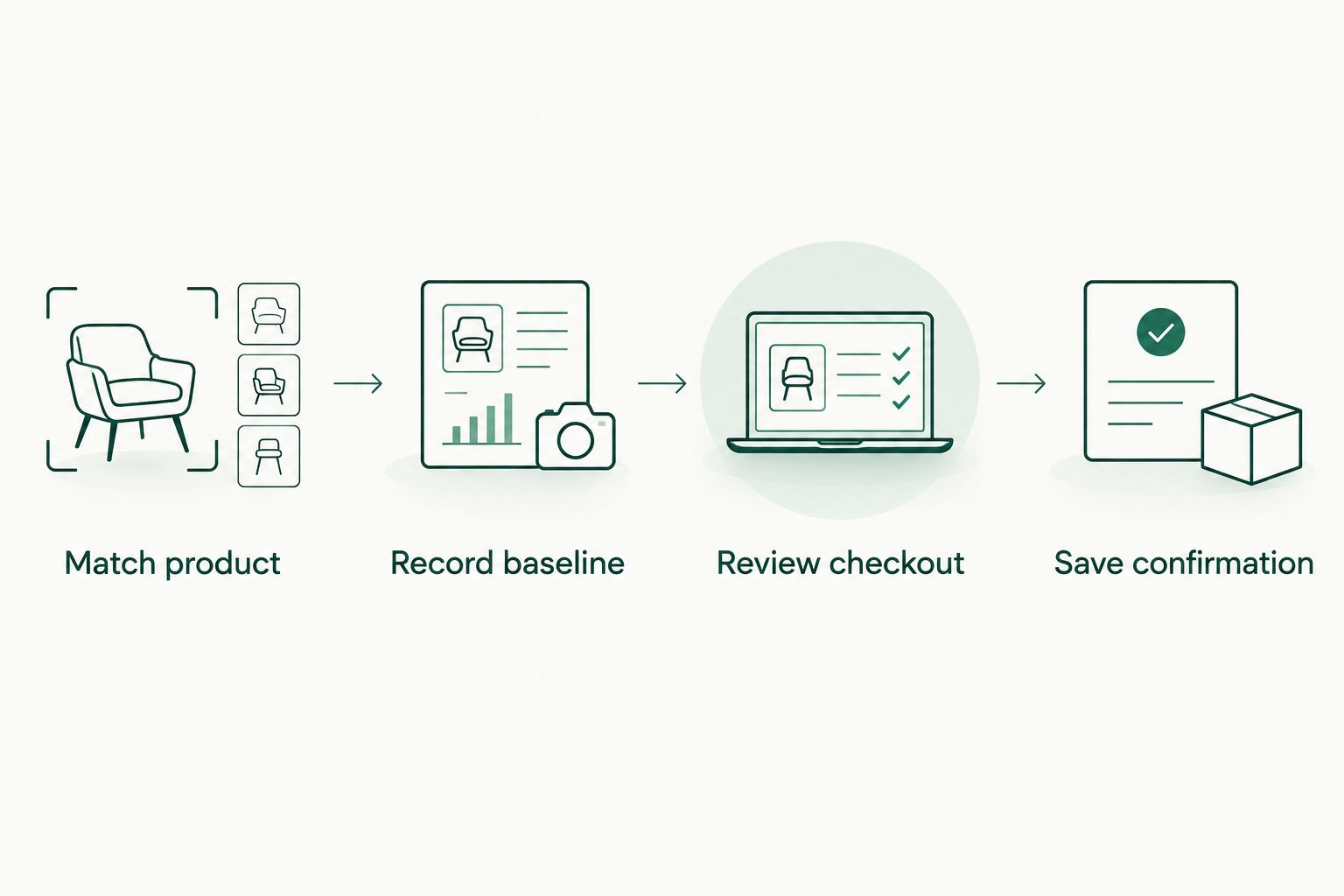
- Match product. Copy the listing’s product name into a field called Product. Add the brand name exactly as the listing presents it.
- Create Variant, Size, and Quantity fields. Write the shade or other relevant option in Variant, and record the labeled amount in Size.
- Choose a baseline of 1 unit when comparing individual products. If you intend to buy a set or multipack, describe its contents instead of labeling it as an equivalent single item.
- Compare the intended item with the other listing. Check the product description as well as the photograph; packaging alone is not enough to establish that the contents match.
- Mark Match status as Matched only when the relevant details agree. Otherwise, write Unresolved and identify the difference.
Expected result: You have a product identity you can reuse without silently switching between versions. An unresolved match stops the comparison; it is not a reason to estimate equivalence.
Keep the description specific but readable. A note such as “same product name, different set contents” is more useful than a generic reminder to check later. It tells you exactly why the comparison cannot support a decision yet.
Comparison-log configuration
A useful log records observations rather than conclusions you cannot revisit. For your 2026 shopping record, include the date and time so an old observation does not look like a current one.
- Record baseline. Create fields called Checked at, Retailer, Listing reference, and Observed item amount. Enter the listing details you actually see, without substituting an advertised saving for the item amount.
- Add Currency and Comparison scope. In the scope field, write either Single product or Complete basket so you do not compare unlike totals later.
- Add Conditions for any qualification displayed with the offer you are considering. Record only what is shown and relevant to your order; do not assume a promotion applies.
- Save a screenshot or a clear note of the observation. Keep personal and payment information out of any record you intend to share.
- Add Next action. Use a concrete instruction such as Recheck before payment, Resolve size mismatch, or Review basket.
Expected result: Your record explains what you saw, when you saw it, and what still needs checking. It does not pretend that the observation will remain unchanged.
For this workflow, distinguish 3 records: the listing observation, the final pre-payment review, and the order confirmation if you purchase. Each serves a different purpose. The first supports research, the second supports approval, and the third records the transaction.
Which checking method fits the job?
These methods complement each other. None replaces the final review of your actual order.
| Method | Best for | Advantage | Limitation |
|---|---|---|---|
| Kbeautyplug Korean skincare comparison | US shoppers researching across retailers | Keeps cross-retailer comparison central to the decision | Does not replace the retailer’s transaction details |
| Manual comparison log | Shoppers revisiting a specific product | Preserves your dated observations and product match | Requires you to record and repeat checks |
| YesStyle checkout review | Shoppers ready to approve an order | Lets you inspect the order you are about to submit | Is not a record of earlier listing observations |
Use comparison for research, a log for memory, and checkout for approval. Treating any one of those as all three leaves a gap in the process.
Final-cart verification
The checkout review is a fresh check, not a formality. In this 2026 workflow, an earlier comparison never counts as approval of a changed basket.
- Review checkout. Add the matched product to your basket and open the order review. Confirm the product name, selected variant, size, and quantity against your log.
- Review the delivery address. Confirm that the destination used for the order is the destination you intended to compare.
- Inspect every displayed charge and adjustment. Check whether a discount you intended to use actually appears, rather than relying on a banner or an earlier observation.
- Record the displayed order total privately under Pre-payment review, with the time of the check. Do not compare a complete order total with another retailer’s item-only amount.
- Read the delivery information and relevant return terms presented for the purchase. Decide whether those terms work for you before submitting payment.
- Save confirmation. If you proceed, retain the order confirmation and compare its product details with your approved review. Keep sensitive information in a secure private location.
Expected result: You either approve a clearly identified order or stop with a specific unresolved issue. “Verified checkout” here means you checked the transaction details; it does not certify authenticity or promise a future outcome.
Use 2 checks as a personal rule: check the product match before building the basket, then check the complete order before payment. These are workflow checkpoints, not a guarantee that the retailer’s information is correct.
Repeat the check whenever your basket changes
The adjacent workflow is a repeat comparison triggered by your own shopping changes. Use it when you change the quantity, select another variant, add an item, or update the delivery address.
Start by duplicating the previous log entry rather than overwriting it. Change Checked at, describe the modification under Change reason, and repeat the relevant product-match and checkout steps. This preserves the difference between the earlier observation and the order you now intend to place.
For an unchanged basket that you revisit later, make a fresh observation before payment. Keep the old entry as history, not as evidence of current terms. You do not need to invent a checking interval; the decision point is the next time you intend to order.
If you are considering another retailer, rebuild the same basket there before deciding. The Amazon vs YesStyle comparison provides a separate retailer-comparison starting point. Your own product match and final order review still determine whether the comparison applies to your purchase.
Expected result: Every changed purchase decision has a corresponding updated record. You can explain why you switched retailers, changed the basket, or chose not to order without reconstructing the decision from memory.
Troubleshooting
The comparison and checkout do not agree
First check whether you are looking at the same product, variant, quantity, currency, and comparison scope. Then inspect the charges and adjustments shown in checkout.
Do not force the numbers to match by ignoring part of the order. Record the discrepancy under Next action and pause if the retailer’s explanation does not resolve it.
The product names match, but the contents differ
Read the size and set contents on both listings. A shared product name does not make a single item and a bundle interchangeable.
Mark Match status as Unresolved until you establish what each listing contains. If the contents remain unclear, leave that listing out of the like-for-like comparison.
A discount does not appear in the order review
Check the displayed conditions against your actual basket and account session. Do not assume that entering a code means it has been applied.
Use the order review as the decision record. If the expected adjustment is absent, resolve the issue before payment or assess the order without that adjustment.
An old entry looks like a current observation
Add a visible Checked at field to every entry in your 2026 checkout log. Keep observations in date order and create a new entry for a fresh check.
Do not relabel an earlier screenshot with a new date. The point of the log is to preserve what you actually observed, not create an appearance of freshness.
You want an authenticity guarantee from the comparison
A price observation, screenshot, or order confirmation does not establish authenticity. Check the retailer identity and any brand-authorized retailer information you can verify separately.
Do not treat packaging photographs or a completed checkout as proof. If authenticity remains unresolved, stop the purchase rather than turning the comparison record into a claim it cannot support.
Customize your workflow
Use Kbeautyplug Korean skincare comparison for the research stage, then adapt the log to the product you actually buy. A lip product needs a shade field; a skincare set needs a contents field. Avoid adding columns that do not change your decision.
For recurring purchases, save the product identity as a reusable template but enter a fresh observation each time. For a mixed basket, keep item-level notes alongside the complete order review so you can see which change affected your decision.
Make the 2026 version of your log easy to audit: retain original observations, explain changed decisions, and separate research from completed orders. A short record you maintain is more useful than a detailed tracker you stop updating.
FAQ
What is the simplest way to do YesStyle price tracking before checkout?
Keep a dated log of the exact product, then repeat the check in your final order review. Match the variant, size, quantity, currency, and comparison scope before deciding.
Do I need an automatic price tracker for this workflow?
No, this workflow uses a manual comparison log. You record observations yourself and recheck the order before payment; it does not depend on an automatic alert.
Is Kbeautyplug a replacement for checking my YesStyle cart?
No, Kbeautyplug supports cross-retailer shopping research, not approval of your final transaction. Confirm the actual product selections, address, charges, and order terms in the retailer’s checkout.
When should I repeat my comparison?
Repeat the comparison before payment and whenever you change the basket or delivery address. An earlier observation does not establish the details of a changed order.
Can I compare a single bottle with a skincare set?
Not as a like-for-like product comparison. Record the set contents separately and decide whether you actually want those contents before comparing complete purchases.
Does verified checkout mean the product is authentic?
No, verified checkout in this guide means you reviewed the transaction details. Authenticity requires separate evidence; a comparison record or order confirmation is not proof.
What should I save after I place an order?
Save the order confirmation and the product details you approved before payment. Keep the record private and avoid exposing payment or personal information in shared screenshots.
One last thing
Add a reason-not-to-buy field. Write down the unresolved mismatch, unclear term, or unnecessary basket addition that would make you stop. That small constraint keeps the workflow focused on a purchase you actually want, rather than on completing checkout because you have already spent time comparing.