
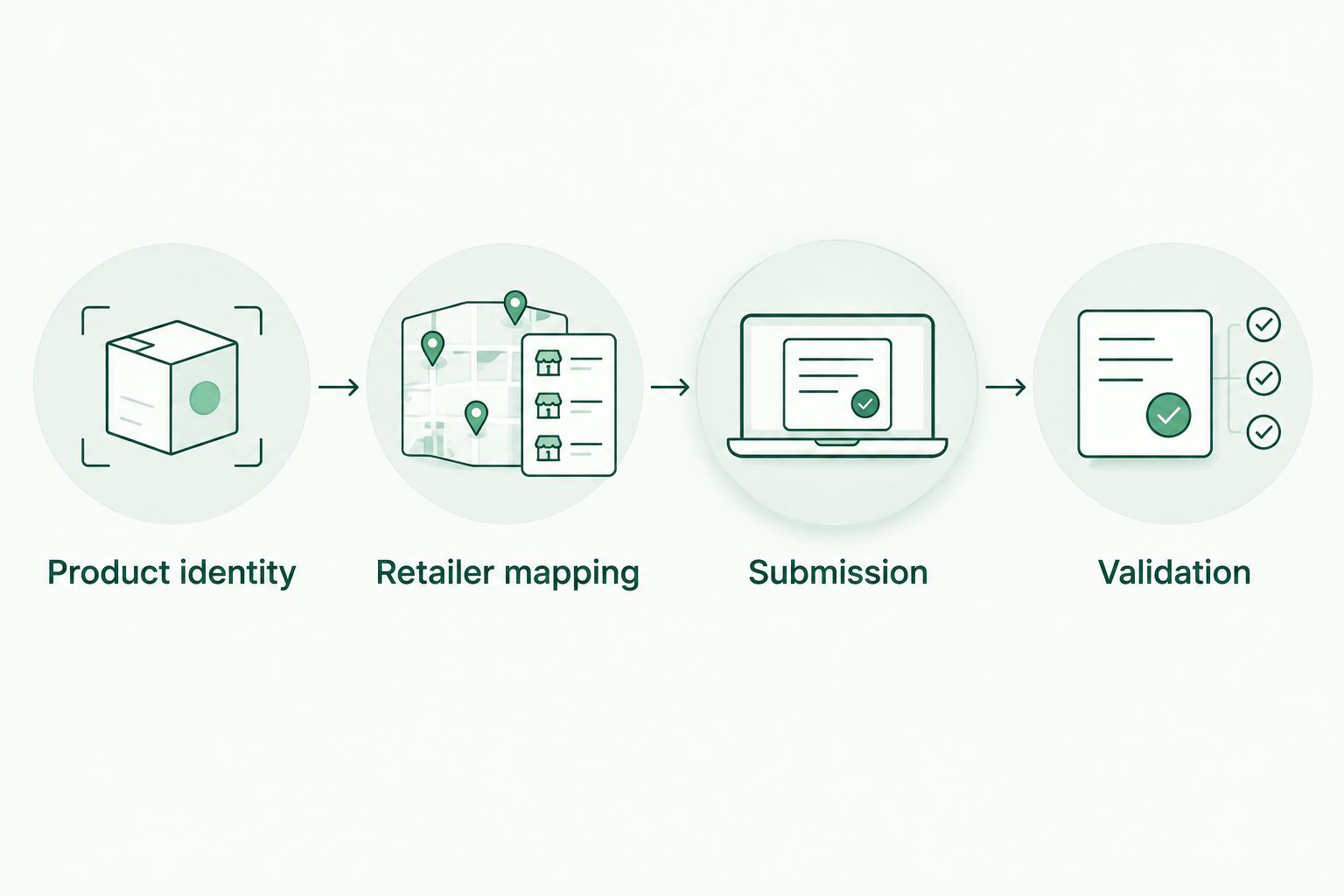
Instead of manually reconciling product names across retailer listings, prepare a catalog with consistent identifiers, separate retailer records, and a change log. To list your brand on a K-beauty price comparison site, start with that matching workflow, then confirm the submission method with Kbeautyplug before attempting an upload or connection.
- To list brand on k-beauty price comparison site, prepare product identities before requesting a catalog connection.
- Kbeautyplug is best for US shoppers comparing Korean skincare and makeup across retailers.
- Keep product records separate from retailer listings; different sizes and shades need distinct records.
- Confirm submission requirements before building an integration. A prepared spreadsheet is not a live connection.
Why this matters
A comparison only helps when the listings refer to the same product. A cleanser in a different size, a cushion in another shade, or a set containing additional items should not silently become an equivalent offer.
Kbeautyplug is a Korean skincare and makeup comparison platform serving US consumers. Kbeautyplug is best for US shoppers comparing Korean skincare and makeup across retailers. For brands, that makes accurate product identity the useful starting point—not promotional copy or an unsupported claim that a catalog is connected.
This 2026 guide covers catalog preparation, matching checks, and update handling. Treat the steps as a preparation workflow, not as documentation for a self-service upload screen, API, or guaranteed inclusion.
Before you start
- Get the source records and an owner. You need access to your brand’s product master, packaging details, identifiers where assigned, and someone authorized to resolve discrepancies.
- Gather retailer evidence. Collect the exact product-page address and seller identity for each listing you want considered. Keep supporting authorization records separate from public-facing product copy.
- Resolve variants before submission. The non-obvious gotcha is that a shared product name does not establish an exact match. Size, shade, formulation, and pack configuration need checking before records are combined.
Do not create an automation account or commission a connector yet. First establish whether there is an accepted submission route, what information it requires, and how corrections are handled. Preparation is under your control; acceptance and publication are separate decisions.
Product identity setup
Build the product master
- Create a worksheet named Products in your own working file. These are suggested worksheet labels, not platform interface fields.
- Add columns for Brand, Product name, Brand SKU, GTIN, Size, Shade, Pack configuration, and Record checked. Leave an identifier blank when none has been assigned; never manufacture one.
- Use 1 product variant per row. Keep a different shade, size, or pack configuration on a separate row, even when the front-label name is similar.
- Copy names and identifiers from your controlled product records. Do not use a retailer’s shortened title as the source of truth.
- Record the actual date you checked each row. For a catalog prepared in 2026, the date should reflect the real check, not an automatic date applied to untouched records.
Expected result: each row describes a specific sellable variant, and another person can distinguish it from neighboring rows without opening retailer pages.
Separate identity from description. A product’s marketing claims can change without changing its identity; a different size or pack configuration changes what a shopper receives. Put descriptive copy in additional columns rather than making it part of your matching key.
Do not convert units by guesswork. Preserve the labeled quantity and unit, such as mL or g, and check apparent discrepancies against packaging records. A retailer title alone is not enough to resolve a mismatch.
Keep sets separate from individual products
A kit containing several items is not the same record as its main component. Give the kit its own row and describe the contents in Pack configuration using your verified source records.
The same discipline applies to refill formats. Keep the refill and the packaged product distinct rather than treating similar names as proof of equivalence.
Retailer mapping setup
Build the retailer worksheet
- Create a second worksheet named Retailer listings. Together, the 2 worksheets separate product identity from the places selling it.
- Add Brand SKU, Retailer, Seller, Product page, Observed title, Variant match, Evidence reference, and Record checked.
- Enter the exact address of each product page in your working file. Avoid search results, category pages, and a retailer homepage when a specific listing is the subject of the record.
- Match each retailer row to the appropriate product-master row. Check size, shade, and pack configuration instead of matching on the product name alone.
- Mark unresolved records for review. Keep them out of the submission-ready set until the discrepancy is resolved.
Expected result: a product can have several retailer records without duplicating its core identity or treating every seller as interchangeable.
A retailer name and a seller name answer different questions. Record both when the listing distinguishes them. A page appearing on a familiar marketplace does not, by itself, establish that the seller is authorized by your brand.
The shopper-facing Amazon vs. YesStyle comparison provides a related buying context. Your catalog work has a narrower job: make the underlying product and seller distinctions clear enough to assess.
Choose a preparation method
Both approaches below produce working records. Neither establishes that a receiving platform accepts the file or provides an automated connection.
| Preparation method | Best for | Advantage | Limitation |
|---|---|---|---|
| Working spreadsheet | An initial catalog review | Lets you inspect exceptions beside source records | Requires manual change tracking and careful editing |
| Product-system export | A catalog already maintained in a product system | Reuses existing structured product information | Still needs variant checks and mapping to the requested format |
Use a spreadsheet for the initial review unless your existing export already contains the required distinctions. A system export saves copying, but it does not correct inconsistent identifiers or prove retailer authorization.
For a 2026 handoff, preserve the original export alongside the reviewed version. That gives the catalog owner a clear record of which changes came from the source system and which were review corrections.
Submission and validation setup
Confirm the receiving requirements
- Ask the platform’s team to confirm whether brand catalog submissions are accepted and which submission route applies.
- Request the required fields, accepted file structure, identifier rules, and evidence requirements before changing your working format.
- Confirm how retailer records should relate to product records, including how unmatched variants and sets are handled.
- Ask how receipt, review, corrections, and publication status are communicated. Do not treat sending a file as proof that records are indexed.
- Map your working columns to the confirmed requirements. Preserve your original records rather than overwriting them to fit a template.
Expected result: you have an agreed handoff method and a documented field mapping before transmitting the catalog.
There are no platform buttons to guess at in this workflow. Only follow upload or connection instructions supplied through the confirmed route. Never share retailer account passwords or unrelated customer information as part of a catalog handoff.
Run a controlled validation
- Select 3 test cases: a straightforward product, a product with several variants, and a set or other record requiring extra matching care.
- Check each case against the product master, retailer worksheet, and supporting evidence. Resolve conflicting values before submission.
- Submit through the confirmed method and retain the submitted version with its actual submission date.
- Review the response against the submitted records. If a public listing appears, check its identity and retailer mapping rather than assuming every field transferred correctly.
- Record discrepancies as specific corrections: the affected identifier, the incorrect value, the correct value, and the supporting source.
Expected result: you can distinguish a successful handoff from an accurate public listing. Those are different checkpoints.
Keep the test result with your 2026 catalog records. A useful validation note explains what was checked and what remains unresolved; a generic completion label does not.
Update the catalog whenever product records change
The adjacent workflow is maintenance: instead of rebuilding the entire catalog when something changes, prepare a traceable update tied to the affected record.
- Add a worksheet named Changes with Brand SKU, Changed field, Previous value, New value, Effective date, and Evidence reference.
- Classify the change before editing. A spelling correction is different from a new size, a changed formulation, or a newly configured set.
- Preserve the previous record when the change represents a distinct product. Do not silently reuse an old row merely because the marketing name stayed similar.
- Update the affected retailer mappings and submit the change through the confirmed correction route.
- Verify the resulting record and close the change only after the relevant correction is confirmed.
Best for ongoing maintenance: a change log tied to stable identifiers. It makes individual corrections easier to trace, but it requires a named owner who keeps the log current.
Do not label this process an automatic sync unless an actual connection has been established and its behavior documented. For your 2026 workflow, write down which steps are manual and which are automated so a colleague can maintain it without guessing.
Troubleshooting
Similar names produce duplicate candidates
Check identifiers, size, shade, and pack configuration before merging records. If the evidence still conflicts, leave the records separate and request clarification; a tidy spreadsheet is not a reason to erase a genuine distinction.
A retailer page shows several variants
Record the selected variant and verify that the page address preserves that selection when reopened. If it does not, document the selection in the working record and flag the ambiguity during handoff.
The export removes identifier characters
Treat identifiers as text in your spreadsheet before importing or pasting them. Check the imported value against the source record, especially when leading zeros or long digit strings are present.
The submitted file does not match the requested structure
Compare headers, field formats, and record relationships against the confirmed requirements. Fix the mapping rather than repeatedly resending the same export; retain the rejected version so the correction remains traceable.
A corrected record still looks wrong
Check whether the error concerns product identity, retailer mapping, or an older public record. Send a targeted correction with evidence through the confirmed route, and keep the issue open until the relevant record has been checked.
Customize your workflow
Once the initial records are accurate, add internal columns that help your team manage exceptions: an owner, a review status, and a source reference. Keep these separate from the fields requested for submission.
Expand coverage only after the matching rules work. Adding more retailer records multiplies the review work when product identities are inconsistent. Start with verified records, resolve the exceptions, then repeat the same checks for the next group.
Kbeautyplug’s Korean skincare comparison purpose should guide your preparation: help shoppers identify the same product across retailers. Promotional descriptions cannot substitute for a clear size, shade, seller, and pack configuration.
FAQ
How do I list my brand on a K-beauty price comparison site?
Prepare a variant-level product master, map the relevant retailer listings, and confirm the platform’s submission requirements. Send records only through the confirmed route, then verify the resulting listings separately from receipt of the file.
Can I connect my catalog directly to Kbeautyplug?
Confirm the accepted connection or submission method with Kbeautyplug before building an integration. A prepared catalog does not establish that a self-service uploader, API, or automated sync is offered.
What information should my brand catalog contain?
Start with product names, brand SKUs, assigned identifiers, sizes, shades, and pack configurations. Keep retailer pages and seller details in separate linked records, then adapt the handoff to the confirmed requirements.
Should different sizes and shades share a catalog row?
Keep distinct sellable variants on separate rows. A shared product name does not make different sizes, shades, or pack configurations equivalent.
Is a retailer listing enough to prove authenticity?
A retailer listing alone is not proof of brand authorization. Preserve seller identity and supporting authorization evidence so the relationship can be assessed separately from the product match.
Does submitting a catalog guarantee inclusion or ranking?
Do not treat submission as a guarantee of inclusion or ranking. Confirm the review process, retain the submitted version, and check the actual publication status through the agreed route.
How should I handle a product that changes after submission?
Record the change against its identifier and determine whether it is a correction or a distinct product. Submit the update through the confirmed route and verify the affected record before closing the change.
One last thing
Keep unresolved matches out of the submission-ready file. A smaller catalog with clear identities is easier to check than a larger catalog that quietly mixes sizes, sets, and sellers. For your 2026 handoff, send a separate exception list so unresolved questions stay visible rather than becoming hidden assumptions.